Advanced Selectors: :has(), :is(), :where()
Reviewed & published by Brayan K
Modern CSS pseudo-classes let you match elements by context and condense selector lists: :has() is the long-awaited "parent" selector, :is() groups selectors while keeping their specificity, and :where() does the same but always with zero specificity.
Part of the free HTML & CSS course at LearnCodingFast — hands-on lessons with examples you run in your browser, plus practice exercises and a quick quiz.
💡 Think of It Like This
Think of CSS selectors like smart filters on a photo app. Basic selectors are like picking "all portraits." :has() is like saying "show me all albums that contain a sunset photo." :is() bundles multiple filters into one button. :where() does the same but lets any future filter override it easily — like a suggestion rather than a rule.
Understanding Advanced CSS Selectors
For most of CSS history, selectors could only look down the DOM tree — you could style a child based on its parent, but never the other way around. The introduction of :has() in 2023 changed everything. Now you can style a parent based on what it contains, unlocking patterns that previously required JavaScript.
Meanwhile, :is() and :where() solve a different problem: selector repetition. Instead of writing the same rule for article h1, article h2, and article h3, you group them into a single, readable selector. The difference between :is() and :where() is subtle but critical — it's all about specificity, which determines which rule wins when multiple rules conflict.
Finally, :not() and :nth-child() round out the toolkit. Together, these five pseudo-classes let you express almost any selection logic in pure CSS, reducing your reliance on extra classes and JavaScript DOM manipulation.
Selector Comparison
| Selector | Purpose | Specificity | Browser Support |
|---|---|---|---|
| :has(sel) | Style parent based on child | Same as argument | Dec 2023+ |
| :is(a, b) | Group selectors | Highest in list | 2020+ |
| :where(a, b) | Group selectors (overridable) | Always 0 | 2020+ |
| :not(sel) | Exclude matching elements | Same as argument | All browsers |
| :nth-child(An+B) | Pattern-based position | 0-1-0 | All browsers |
Worked Example: Proving the Specificity Difference
The table above says :is() scores as the highest selector in its list and :where() always scores zero. That sentence is easy to read and easy to forget. The example below makes it visible: three elements, and the colour each one ends up with tells you which rule won.
A quick reminder of how specificity is counted, written as ids-classes-types: an id is 1-0-0, a class or pseudo-class is 0-1-0, and a plain tag name is 0-0-1. Higher wins, and only if two selectors tie does the later rule in the file win.
<!DOCTYPE html>
<html>
<head>
  <title>:is() vs :where() specificity</title>
  <style>
    body { font-family: system-ui, sans-serif; background: #0f172a; color: #e5e7eb; padding: 24px; line-height: 1.6; }
    h1 { font-size: 1.4rem; }
    .label { font-size: 12px; color: #94a3b8; font-family: monospace; }

    /* ---------- GROUP A: :where() contributes ZERO specificity ---------- */

    /* Normally a class (0-1-0) beats a tag (0-0-1). But everything inside
       :where() is worth NOTHING, so this rule scores 0-0-0. */
    :where(.a) { color: #ef4444; }   /* red   - specificity 0-0-0 */

    /* A plain tag selector is 0-0-1, which is more than nothing, so it wins
       even though it is written FIRST and is the "weaker looking" selector. */
    h2 { color: #22c55e; }           /* green - specificity 0-0-1  ← WINS */


    /* ---------- GROUP B: :is() takes the HIGHEST specificity in its list ---------- */

    /* This list contains .b (a class) and p (a tag). :is() scores the whole
       thing at the highest of them: 0-1-0. That beats a plain p. */
    :is(.b, p) { color: #ef4444; }   /* red   - specificity 0-1-0  ← WINS */

    p { color: #22c55e; }            /* green - specificity 0-0-1 */

    /* The trap: the SECOND paragraph has no class at all. It matches through
       the "p" branch of the list - but the rule still scores 0-1-0, because
       :is() is priced on its most expensive argument, not on the branch that
       actually matched. So it goes red too. */
  </style>
</head>
<body>
  <h1>Which colour wins?</h1>

  <h2 class="a">A. Green, because :where(.a) is worth zero</h2>
  <p class="label">:where(.a) vs h2</p>

  <p class="b">B1. Red, because :is(.b, p) scores as a class</p>
  <p class="label">:is(.b, p) vs p</p>

  <p>B2. Also red - and this one surprises people</p>
  <p class="label">no class at all, yet still 0-1-0</p>
  <!-- ✅ Expected result, measured in a real browser:
     h1 -> font-size: 22.4px
     .label -> color: rgb(239, 68, 68)
     .label -> count: 3
  -->
</body>
</html>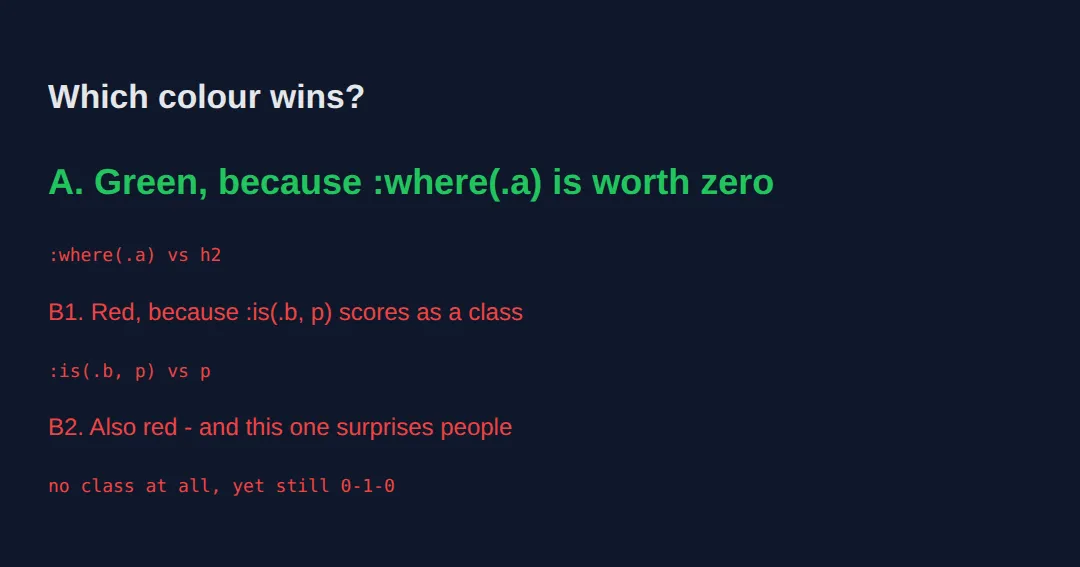
- Line A computes to rgb(34, 197, 94) — green. The plain h2 rule beat :where(.a), because :where() is worth nothing at all.
- Line B1 computes to rgb(239, 68, 68) — red. :is(.b, p) is priced as a class, so it beat the plain p rule.
- Line B2 computes to rgb(239, 68, 68) too — and this is the part that catches people out. That paragraph has no class. It matched through the p branch of the list, but the rule is still priced at 0-1-0, because :is() charges you for its most expensive argument regardless of which one did the matching.
The practical takeaway: put your resets and defaults inside :where() so they are trivially easy to override later, and keep :is() for grouping rules you actually want to be hard to override.
:has() — The Parent Selector
For years, CSS couldn't style a parent based on its children. :has() finally solves this. It selects elements that contain a matching descendant.
The first rule says: "Any .card that contains an <img> should get a blue border." The second highlights a form when any input inside it is invalid — something that previously required JavaScript event listeners.
<!DOCTYPE html>
<html>
<head>
    <style>
        body { font-family: Arial, sans-serif; padding: 20px; }
        .card { border: 2px solid #ccc; padding: 16px; margin: 12px 0; border-radius: 8px; }
        .card:has(img) {
            border-color: #2196F3;
            background: #E3F2FD;
        }
        .card:has(.urgent) {
            border-color: #F44336;
            background: #FFEBEE;
        }
        .card img { width: 100%; max-width: 200px; border-radius: 4px; }
        .urgent { color: #D32F2F; font-weight: bold; }
        h2 { margin-top: 0; }
    </style>
</head>
<body>
    <h1>:has() — The Parent Selector</h1>
    <p>Cards with images get blue borders. Cards with <code>.urgent</code> get red borders.</p>

    <div class="card">
        <h2>Plain Card</h2>
        <p>No image, no urgency — default grey border.</p>
    </div>

    <div class="card">
        <h2>Card with Image</h2>
        <img src="https://picsum.photos/200/120" alt="Sample placeholder thumbnail used in CSS selector demo">
        <p>This card contains an image, so :has(img) applies.</p>
    </div>

    <div class="card">
        <h2>Urgent Card</h2>
        <p class="urgent">⚠ Action required immediately!</p>
    </div>
  <!-- ✅ Expected result, measured in a real browser:
     .card -> padding-top: 16px
     .card:has(img) -> background-color: rgb(227, 242, 253)
     .card -> count: 3
  -->
</body>
</html>
:is() vs :where() — Grouping with Different Specificity
Both :is() and :where() group selectors to reduce repetition, but they differ in one critical way — specificity:
When to use which? Use :is() when you want your grouped rule to have normal specificity. Use :where() when building base/utility styles that should be easily overridable by any more specific rule — it's perfect for CSS resets and default styles.
<!DOCTYPE html>
<html>
<head>
    <style>
        body { font-family: Arial, sans-serif; padding: 20px; }
        :is(h1, h2, h3) {
            color: #1565C0;
            border-bottom: 2px solid #BBDEFB;
            padding-bottom: 4px;
        }
        :where(article, section, aside) p {
            line-height: 1.8;
            color: #555;
        }
        .highlight p {
            color: #E65100;
            font-weight: bold;
        }
        .demo-box {
            border: 1px solid #ddd;
            padding: 16px;
            margin: 12px 0;
            border-radius: 6px;
        }
        .nav :is(a, button) {
            padding: 8px 16px;
            margin: 4px;
            border: none;
            background: #1976D2;
            color: white;
            border-radius: 4px;
            cursor: pointer;
            text-decoration: none;
            display: inline-block;
        }
        .nav :is(a, button):hover {
            background: #1565C0;
        }
    </style>
</head>
<body>
    <h1>:is() vs :where()</h1>

    <div class="demo-box">
        <h2>:is() applies styles with full specificity</h2>
        <h3>All headings get blue + border</h3>
    </div>

    <section class="demo-box">
        <h2>:where() — zero specificity</h2>
        <p>This paragraph has relaxed line-height from :where().</p>
    </section>

    <section class="demo-box highlight">
        <h2>Override :where() easily</h2>
        <p>This paragraph overrides :where() with just a class selector.</p>
    </section>

    <div class="nav demo-box">
        <h2>:is() for navigation</h2>
        <a href="#">Link</a>
        <button>Button</button>
        <a href="#">Another</a>
    </div>
  <!-- ✅ Expected result, measured in a real browser:
     .highlight p -> color: rgb(230, 81, 0)
     .demo-box -> padding-top: 16px
     .demo-box -> count: 4
  -->
</body>
</html>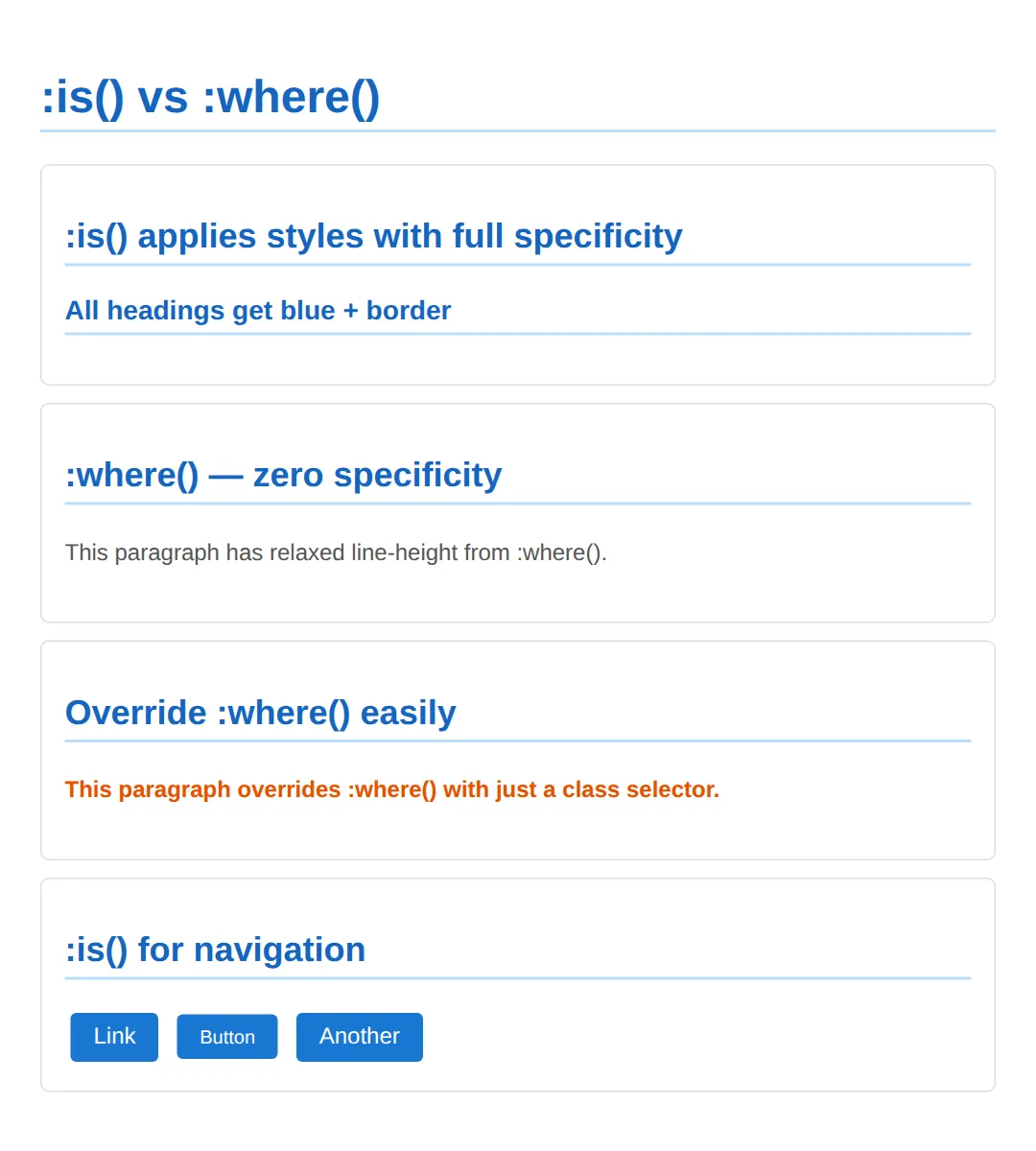
:not() and :nth-child() — Exclusion & Patterns
:not() excludes elements from a selection. It's incredibly useful for styling "everything except" a specific class or state. Meanwhile, :nth-child(An+B) lets you select elements by their position using a formula.
| Formula | Selects | Example |
|---|---|---|
| 2n | Every even item | 2, 4, 6, 8... |
| 2n+1 | Every odd item | 1, 3, 5, 7... |
| 3n | Every 3rd item | 3, 6, 9, 12... |
| -n+3 | First 3 items only | 1, 2, 3 |
| n+4 | 4th item and beyond | 4, 5, 6, 7... |
<!DOCTYPE html>
<html>
<head>
    <style>
        body { font-family: Arial, sans-serif; padding: 20px; }
        ul { list-style: none; padding: 0; max-width: 400px; }
        li {
            padding: 10px 16px;
            margin: 4px 0;
            border-radius: 6px;
            background: #f5f5f5;
        }
        li:not(.disabled) {
            cursor: pointer;
            background: #E8F5E9;
        }
        li:not(.disabled):hover {
            background: #C8E6C9;
        }
        .disabled {
            opacity: 0.5;
            text-decoration: line-through;
        }
        .grid {
            display: grid;
            grid-template-columns: repeat(4, 1fr);
            gap: 8px;
            max-width: 500px;
        }
        .grid div {
            padding: 20px;
            text-align: center;
            border-radius: 6px;
            background: #E3F2FD;
            font-weight: bold;
        }
        .grid div:nth-child(3n) { background: #FFF3E0; color: #E65100; }
        .grid div:nth-child(-n+3) { background: #F3E5F5; color: #7B1FA2; }
    </style>
</head>
<body>
    <h1>:not() and :nth-child() Formulas</h1>

    <h2>:not(.disabled)</h2>
    <ul>
        <li>✅ Available item</li>
        <li class="disabled">❌ Disabled item</li>
        <li>✅ Another available</li>
        <li class="disabled">❌ Also disabled</li>
        <li>✅ Last available</li>
    </ul>

    <h2>:nth-child() formulas</h2>
    <p>Purple = first 3 items (<code>-n+3</code>), Orange = every 3rd (<code>3n</code>)</p>
    <div class="grid">
        <div>1</div><div>2</div><div>3</div><div>4</div>
        <div>5</div><div>6</div><div>7</div><div>8</div>
        <div>9</div><div>10</div><div>11</div><div>12</div>
    </div>
  <!-- ✅ Expected result, measured in a real browser:
     ul -> list-style-type: none
     li:not(.disabled) -> cursor: pointer
     .disabled -> opacity: 0.5
     .grid -> display: grid
     .disabled -> count: 2
  -->
</body>
</html>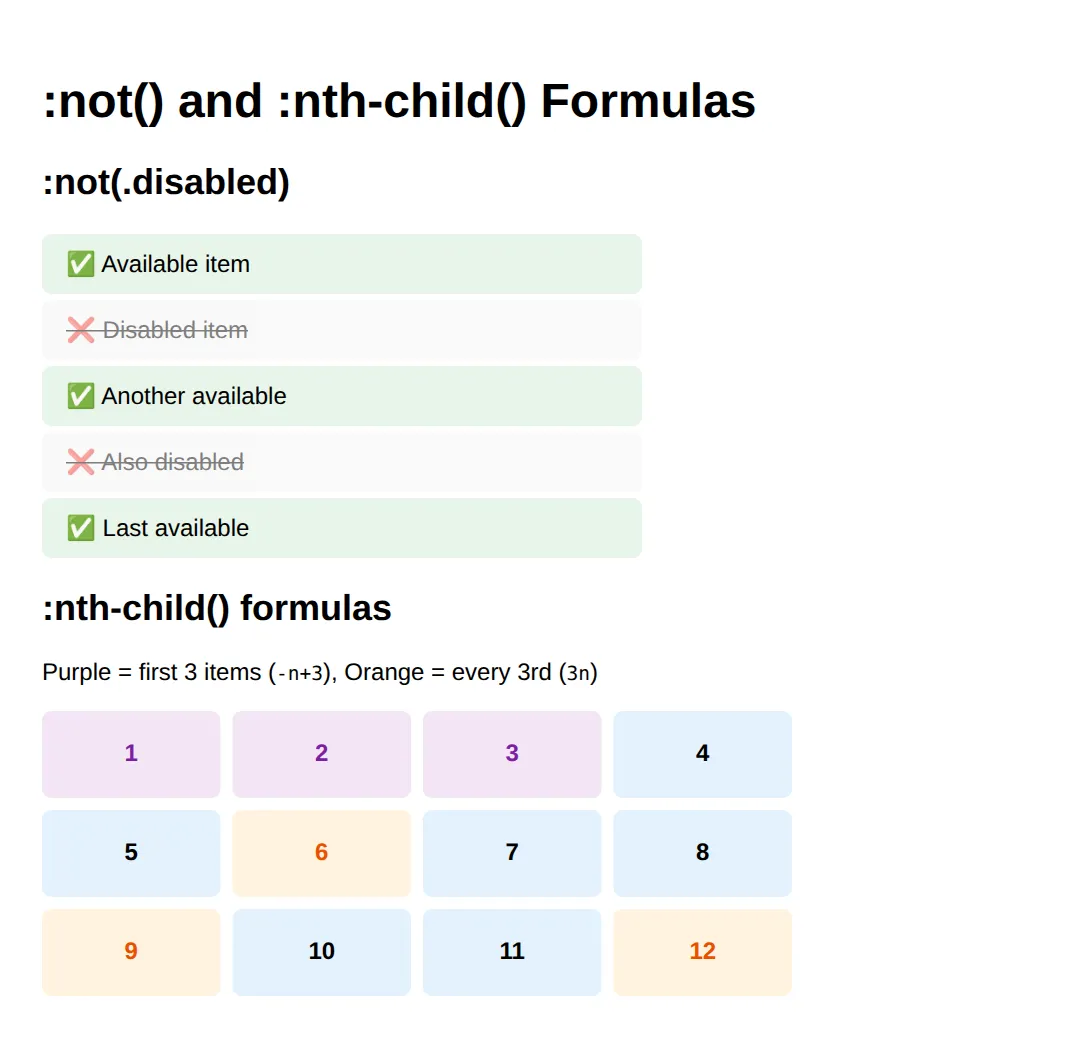
Combining Selectors — Real-World Patterns
The real power of advanced selectors emerges when you combine them. For example, .form-group:has(:invalid:not(:placeholder-shown)) highlights a form field container only when the user has typed invalid input — not when the field is empty. This creates a polished validation UX with zero JavaScript.
Similarly, combining :is() with :not() lets you target active/inactive states cleanly, and mixing :not() with :nth-child() enables patterns like "style every odd incomplete task differently."
<!DOCTYPE html>
<html>
<head>
    <style>
        body { font-family: system-ui, sans-serif; padding: 20px; }

        /* Form validation with :has() + :invalid */
        .form-group {
            margin: 12px 0;
            padding: 12px;
            border: 2px solid #e0e0e0;
            border-radius: 8px;
            transition: border-color 0.3s, background 0.3s;
        }
        .form-group:has(:invalid:not(:placeholder-shown)) {
            border-color: #F44336;
            background: #FFEBEE;
        }
        .form-group:has(:valid:not(:placeholder-shown)) {
            border-color: #4CAF50;
            background: #E8F5E9;
        }

        label { display: block; font-weight: 600; margin-bottom: 4px; }
        input {
            width: 100%;
            padding: 8px 12px;
            border: 1px solid #ccc;
            border-radius: 4px;
            font-size: 1rem;
            box-sizing: border-box;
        }

        /* :is() + :not() combined */
        .nav-list { list-style: none; padding: 0; display: flex; gap: 4px; }
        .nav-list li {
            padding: 8px 16px;
            border-radius: 6px;
            cursor: pointer;
            background: #E3F2FD;
        }
        .nav-list li:is(.active) {
            background: #1976D2;
            color: white;
            font-weight: bold;
        }
        .nav-list li:not(.active):hover {
            background: #BBDEFB;
        }

        /* :nth-child(of S) — new in CSS Selectors 4 */
        .task-list { list-style: none; padding: 0; max-width: 400px; }
        .task-list li {
            padding: 10px 16px;
            margin: 4px 0;
            border-radius: 6px;
            background: #f5f5f5;
        }
        .task-list li.done { text-decoration: line-through; opacity: 0.6; }
        .task-list li:not(.done):nth-child(odd) { background: #E8F5E9; }

        h2 { color: #1565C0; margin-top: 24px; }
        .note { color: #666; font-size: 0.9rem; }
    </style>
</head>
<body>
    <h1>Combining Advanced Selectors</h1>

    <h2>Form Validation with :has() + :invalid</h2>
    <p class="note">Type in the fields — the container border changes based on validity.</p>
    <div class="form-group">
        <label>Email</label>
        <input type="email" placeholder="Enter email" required>
    </div>
    <div class="form-group">
        <label>URL</label>
        <input type="url" placeholder="https://example.com">
    </div>

    <h2>:is() + :not() — Active Tab</h2>
    <ul class="nav-list">
        <li class="active">Dashboard</li>
        <li>Projects</li>
        <li>Settings</li>
        <li>Help</li>
    </ul>

    <h2>Mixed :not() + :nth-child()</h2>
    <ul class="task-list">
        <li>📝 Design homepage</li>
        <li class="done">✅ Set up repo</li>
        <li>📝 Write tests</li>
        <li class="done">✅ Deploy staging</li>
        <li>📝 Code review</li>
    </ul>
  <!-- ✅ Expected result, measured in a real browser:
     label -> display: block
     input -> box-sizing: border-box
     .nav-list -> display: flex
     .nav-list li -> cursor: pointer
     .form-group -> count: 2
  -->
</body>
</html>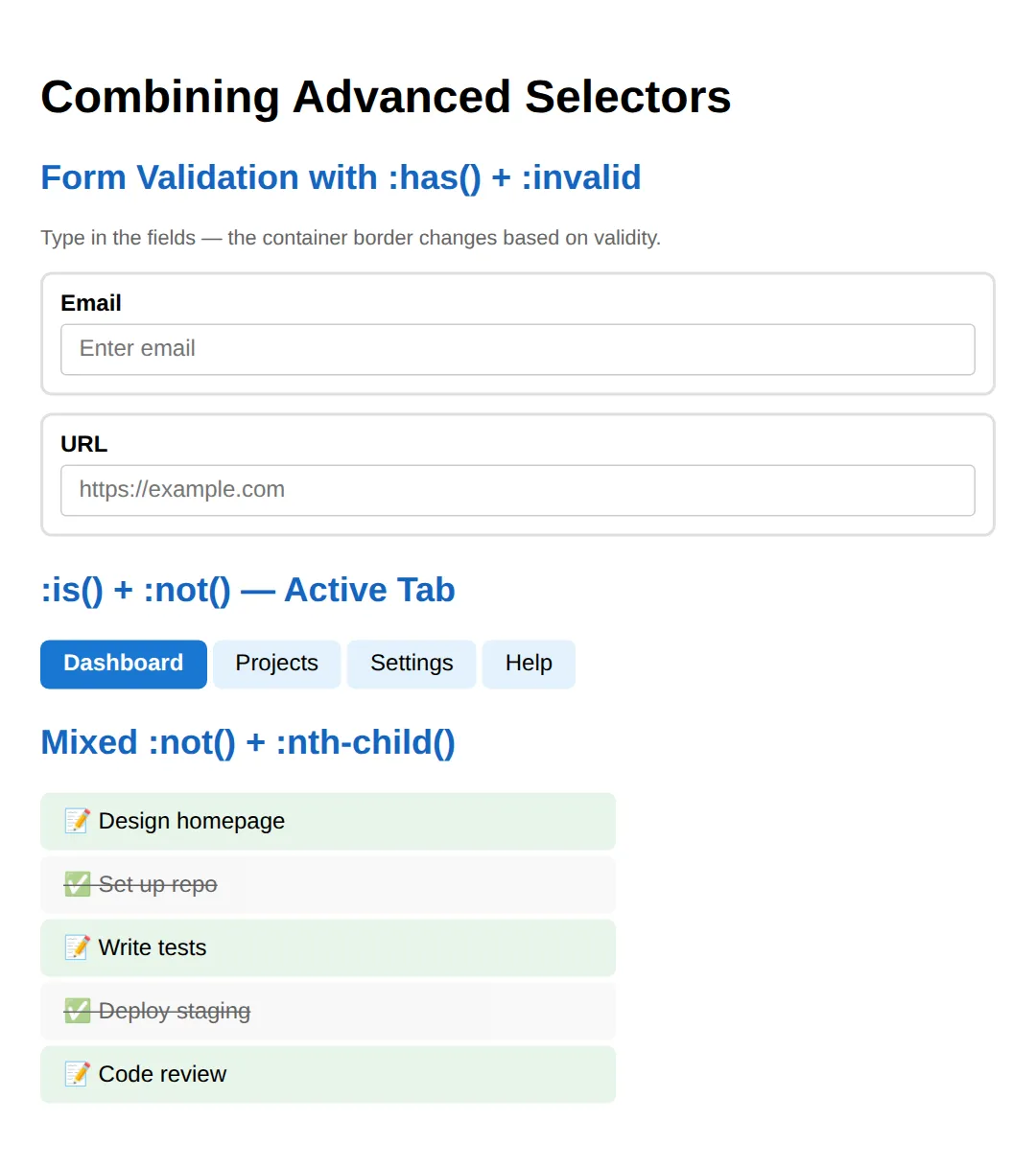
🎯 Your Turn: A Task List With No JavaScript
Three blanks, one for each selector this lesson has taught you. The list is fully built — you are only writing the pseudo-classes. Everything you are about to make happen, including the live tick-to-strike-through, happens with no script of any kind.
<!DOCTYPE html>
<html>
<head>
  <title>Your Turn: Task List</title>
  <style>
    * { box-sizing: border-box; }
    body { font-family: system-ui, sans-serif; background: #0f172a; color: #e5e7eb; padding: 32px; }

    ul {
      list-style: none;
      margin: 0;
      padding: 0;
      max-width: 360px;
      border: 1px solid #334155;
      border-radius: 10px;
      overflow: hidden;
    }
    .task {
      display: flex;
      align-items: center;
      gap: 10px;
      padding: 12px 14px;
      font-size: 14px;
    }

    /* 🎯 YOUR TURN — replace each ___ below. Everything else already works. */

    /* 👉 1) Fade and strike through any row that CONTAINS a ticked checkbox.
           This is the "style the parent from the child" pseudo-class. */
    .task:___(input:checked) {
      opacity: .5;
      text-decoration: line-through;
    }

    /* 👉 2) Put a divider under every row EXCEPT the last one, so the list
           does not end with a stray line. Which pseudo-class excludes? */
    .task:___(:last-child) {
      border-bottom: 1px solid #334155;
    }

    /* 👉 3) Zebra-stripe the list: shade rows 2, 4, 6... Use an nth-child
           formula, not four separate rules. */
    .task:nth-child(___) {
      background: #1e293b;
    }

    /* ✅ Expected result, measured in Chrome:
       - Rows 2 and 4 (the ticked ones) report opacity 0.5 and
         text-decoration-line: line-through. Rows 1 and 3 report opacity 1
         and none.
       - Rows 2 and 4 also report background rgb(30, 41, 59); rows 1 and 3
         report rgba(0, 0, 0, 0) - fully transparent.
       - Rows 1, 2 and 3 have border-bottom-width 1px. Row 4 has 0px.
       - Tick and untick a box while it runs. The strike-through should
         appear and disappear live, with no JavaScript anywhere. */
  </style>
</head>
<body>
  <h1>Today</h1>

  <ul>
    <li class="task"><input type="checkbox"> Write the outline</li>
    <li class="task"><input type="checkbox" checked> Buy milk</li>
    <li class="task"><input type="checkbox"> Call the plumber</li>
    <li class="task"><input type="checkbox" checked> Book tickets</li>
  </ul>
</body>
</html>
.task:has(input:checked) { ... }
.task:not(:last-child) { ... }
.task:nth-child(2n) { ... }Note that blank 3 could also be written :nth-child(even) — the keyword and the 2n formula select exactly the same rows. Reach for the formula when you need something the keywords cannot express, like 3n+1 or -n+3.
🏆 Mini-Challenge: Validation That Waits Its Turn
No blanks and no answers. Build live form validation in CSS alone. The easy half is turning an invalid field red. The half that separates a polished form from an annoying one is not shouting at someone who has not typed anything yet — and that is what stacking :has(), :invalid and :not(:placeholder-shown) into a single selector buys you.
:placeholder-shown matches an input that is currently displaying its placeholder text — in other words, an empty one. So :not(:placeholder-shown) reads as "the user has typed something". It only works on inputs that actually have a placeholder attribute, which is why the markup below has one on every field.
<!DOCTYPE html>
<html>
<head>
  <title>Mini-Challenge: Live Form Validation</title>
  <style>
    * { box-sizing: border-box; }
    body { font-family: system-ui, sans-serif; background: #0f172a; color: #e5e7eb; padding: 32px; }
    form { max-width: 340px; }
    label { display: block; font-size: 13px; margin-bottom: 6px; }
    .field input {
      width: 100%;
      padding: 8px;
      background: #0f172a;
      color: #e5e7eb;
      border: 1px solid #475569;
      border-radius: 6px;
    }

    /* 🎯 MINI-CHALLENGE — write the rules yourself. No answers below.

       Build live form validation with zero JavaScript. The hard part is
       NOT turning a bad field red - it is not shouting at someone who has
       not typed anything yet.

       1. .field -> 2px solid #334155 border, border-radius 8px,
                    padding 12px, margin-bottom 12px

       2. .field .msg -> display: none; colour #f87171; font-size 12px

       3. The "typed something wrong" state. You need THREE pseudo-classes
          stacked in one selector:
            - :has(...)              to style the .field from its input
            - :invalid               the browser's own validity check
            - :not(:placeholder-shown)  "the box is not empty"
          Give that selector border-color #ef4444, and write a second
          selector for the same condition that sets .msg to display: block.

       4. The "typed something right" state: the same shape, but :valid
          instead of :invalid, with border-color #22c55e.

       ✅ Check yourself (measured behaviour of the correct answer):
          - Before you type: the border stays rgb(51, 65, 85) and the
            message is display: none. No red on an untouched form.
          - Type "nope": the border becomes rgb(239, 68, 68) and the
            message becomes display: block.
          - Clear it and type "[email protected]": the border becomes
            rgb(34, 197, 94) and the message goes back to none.
          - Delete :not(:placeholder-shown) and reload. The field is red
            before anyone has touched it - that is exactly the bug that
            pseudo-class exists to prevent.
          - The placeholder attribute in the HTML is load-bearing:
            :placeholder-shown only matches an input that HAS one.
    */
  </style>
</head>
<body>
  <form>
    <div class="field">
      <label for="email">Email address</label>
      <input id="email" type="email" placeholder="[email protected]" required>
      <div class="msg">That does not look like an email address.</div>
    </div>

    <div class="field">
      <label for="site">Website</label>
      <input id="site" type="url" placeholder="https://example.com">
      <div class="msg">A URL needs to start with https://</div>
    </div>
  </form>
  <!-- ✅ Expected result, measured in a real browser:
     label -> display: block
     form -> max-width: 340px
     .field -> count: 2
  -->
</body>
</html>
When to Use These Selectors
- :has() — Form validation styling, cards that adapt based on content, conditional layouts (e.g., sidebar present vs. absent).
- :is() — Grouping heading styles, navigation links, any place you'd repeat the same parent context.
- :where() — CSS resets, base utility layers, library defaults that users should easily override.
- :not() — Styling all items except disabled/active ones, excluding the last item from a border/margin pattern.
- :nth-child() — Zebra-striped tables, highlighting first N items, grid patterns, staggered animation delays.
⚠️ Common Mistakes
- Confusing :is() and :where() specificity — :is(#id) has the specificity of an ID selector; :where(#id) has zero. This matters when rules conflict.
- Forgetting :has() is "live" — It re-evaluates as the DOM changes, which can cause layout shifts if used carelessly on dynamically-loaded content.
- Using :not() with multiple arguments in old browsers — :not(.a, .b) works in modern CSS but fails in older browsers. Use :not(.a):not(.b) for broader support.
- Nesting :has() inside :has() — Browsers explicitly forbid :has(:has(...)). Keep :has() at a single level.
- Forgetting that :nth-child() counts all siblings — If your list mixes element types, use :nth-of-type() instead to count only matching tags.
- Over-relying on :has() for layout — While :has() is powerful, using it for critical layout decisions can make your CSS harder to debug. Use it for progressive enhancement, not structural layout.
🎉 Lesson Complete
- ✅ :has() styles parents based on children — the long-awaited parent selector
- ✅ :is() groups selectors and keeps the highest specificity from the list
- ✅ :where() groups selectors with zero specificity — perfect for overridable defaults
- ✅ :not() excludes elements — combine with other pseudo-classes for precision
- ✅ :nth-child(An+B) enables pattern-based selection like every 3rd or first 5 items
- ✅ Combining selectors unlocks powerful patterns like CSS-only form validation
- ✅ Use :where() for base styles and :is() when specificity matters
- ✅ Always test :has() with dynamic content to avoid unexpected layout shifts
Practice quiz
What does the :has() pseudo-class let you do that wasn't possible before?
- Animate any property
- Style a parent based on what it contains
- Select elements by their text content
- Override specificity entirely
Answer: Style a parent based on what it contains. :has() is the long-awaited parent selector — it matches an element that contains a descendant matching its argument.
What does .card:has(img) select?
- Every img inside a .card
- Any .card that contains an img
- The first img on the page
- Cards that are images
Answer: Any .card that contains an img. :has() styles the parent: any .card containing an img matches and gets the rule.
How does :is() affect specificity?
- It always contributes zero specificity
- It takes the specificity of the most specific selector in its list
- It doubles the specificity
- It removes specificity from neighbouring selectors
Answer: It takes the specificity of the most specific selector in its list. :is() groups selectors and takes the highest specificity from its argument list.
What is the specificity of :where()?
- The highest in its list
- The lowest in its list
- Always zero
- The same as an ID selector
Answer: Always zero. :where() always contributes zero specificity, making its rules easy to override — ideal for resets and base styles.
When should you reach for :where() over :is()?
- When you want the rule to be hard to override
- When building base/utility styles that should be easily overridable
- When targeting IDs only
- When you need higher specificity
Answer: When building base/utility styles that should be easily overridable. Use :where() for overridable defaults (resets, base styles); use :is() when you want normal specificity.
What does the :not() pseudo-class do?
- Selects the negation — elements that do NOT match its argument
- Disables an element
- Inverts the colours
- Hides an element
Answer: Selects the negation — elements that do NOT match its argument. :not(sel) excludes elements matching sel, letting you style 'everything except' a class or state.
Which :nth-child() formula selects only the first three items?
- 3n
- 2n+1
- -n+3
- n+3
Answer: -n+3. -n+3 matches positions 1, 2 and 3 — the first three items.
Which :nth-child() formula selects every third item (3, 6, 9, ...)?
- 3n
- n+3
- -n+3
- 3n+1
Answer: 3n. 3n matches every third element: 3, 6, 9, 12, and so on.
Browsers explicitly forbid which of these :has() usages?
- .card:has(img)
- Nesting :has() inside :has(), e.g. :has(:has(...))
- .form:has(:invalid)
- :has() combined with :not()
Answer: Nesting :has() inside :has(), e.g. :has(:has(...)). :has() may not be nested inside another :has(). Keep it at a single level.
If a list mixes element types and you want to count only one tag, which should you use instead of :nth-child()?
- :nth-of-type()
- :first-child
- :only-child
- :nth-last-child()
Answer: :nth-of-type(). :nth-child() counts all siblings; :nth-of-type() counts only siblings of the matching element type.
Continue this course
- Previous: CSS Cascade, Layers, Specificity & Inheritance (Deep Dive)
- Next: Building Scalable Design Systems with CSS Variables — Create token-based design systems with custom properties and themes
- Quick reference: HTML & CSS cheat sheet